
Real-Time Payment Card Is Coming: Send and Receive Instantly with Irrevocable Good Funds
Real-Time Certainty, Real-Time Control — Across POS, MOTO, Ecommerce and More
 To simplify and accelerate
the way businesses and consumers transact by introducing
the Real-Time Payment Card—delivering good funds
instantly with irrevocable certainty, ISO 20022
batching, and full QuickBooks® QBO integration.
To simplify and accelerate
the way businesses and consumers transact by introducing
the Real-Time Payment Card—delivering good funds
instantly with irrevocable certainty, ISO 20022
batching, and full QuickBooks® QBO integration.
TodayPayments.com is
redefining how America gets paid with the Real-Time
Payment Card. Leveraging RTP®, FedNow®, and ISO 20022
messaging, we help businesses batch, request, and settle
payments in seconds—with finality, flexibility, and full
QuickBooks® QBO synchronization.
The Real-Time Payment Card is coming—and it’s going to change the financial landscape. Imagine combining the swipe-and-go simplicity of a card with the speed and irrevocability of real-time A2A payments. This is no longer a future concept—it’s becoming reality.
By merging FedNow® and RTP® rails with rich ISO 20022 messaging, and seamless QuickBooks® QBO integration, this solution empowers merchants and customers to send and receive good funds instantly, whether in-store, online, or by mobile.
The Real-Time Payment Card represents a leap beyond legacy debit and credit models. Instead of pulling funds through slow clearinghouses or costly card networks, it pushes money instantly from one bank account to another using the RTP® or FedNow® network.
Merchants can accept payments with good funds delivered in real time, eliminating the risk of chargebacks, returns, or processing lag. And with QuickBooks® QBO integration, each transaction is automatically tracked, reconciled, and categorized—bringing unmatched financial visibility and control.
See
the features
QuickBooks® ACH, Cards, FedNow and Real-Time Payments
- Payment processing for all QuickBooks desktop, Pro, Premier, Enterprise and also QBO QuickBooks Online Our software is designed for simplicity and ease-of-use.
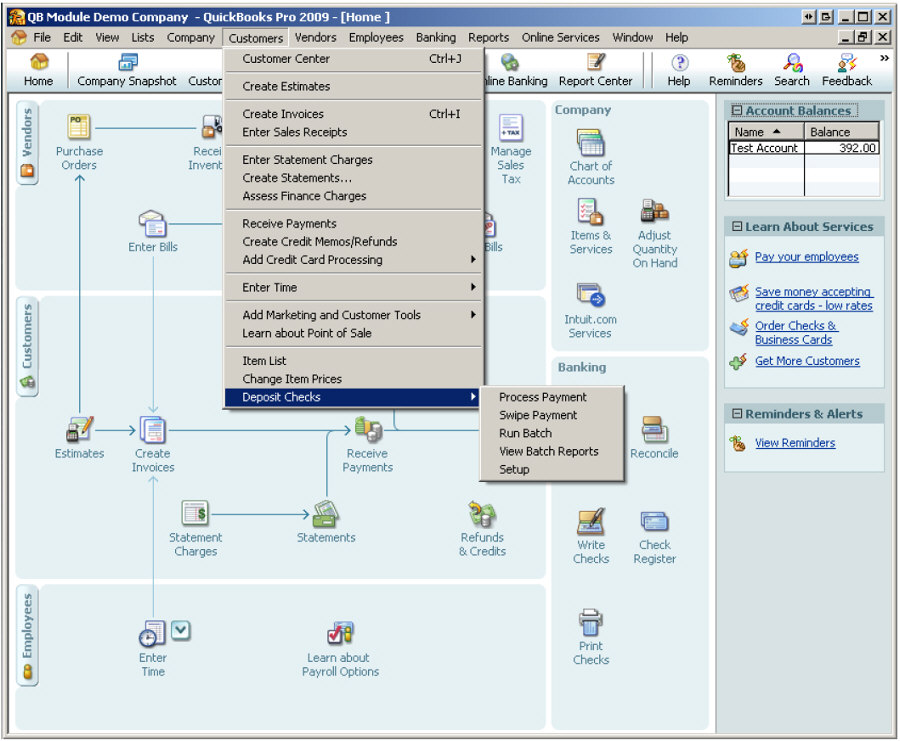
- ~ Automate Account Receivable Collection
- ~ Automate Account Payable Payments
- ~ One-time and Recurring Debits / Credits
Secure QB Plugin payment processing through QuickBooks ® specializes in the origination of moving money electronically.
Batch Processing, Recurring Payments, and Digital Invoicing — All in Real Time
The Real-Time Payment Card doesn’t just handle individual transactions—it’s built for enterprise-scale batching and automation. Businesses can upload Excel, XML, or JSON files using ISO 20022 message specifications to initiate:
- A2A (Account-to-Account) payments
- B2B (Business-to-Business) settlements
- C2B (Consumer-to-Business) invoicing and checkouts
These can be recurring or one-time payments, driven by digital invoicing, mobile messaging, or hosted payment pages, with immediate good funds confirmation.
✅ RTP® Parameters, Attributes, Benefits and Features
Parameters
- Payment Rails: RTP®, FedNow®
- Integration: QuickBooks® QBO, ISO 20022-compliant banking systems
- File Formats Supported: Excel (.xlsx), XML, JSON
- Transaction Modes: A2A, B2B, C2B
- Delivery Channels: POS, Ecommerce, MOTO, Mobile
- Settlement Model: Push-based, good funds, irrevocable
- Digital Tools: Request for Payment (RfP™), Hosted Payment Pages, Mobile & Text
Attributes
- Instant Settlement: Send and receive funds 24/7/365 with finality
- Irrevocable Payments: Eliminate chargebacks and reversals
- Good Funds Model: Confirmed availability at time of transaction
- Batch Upload Capability: Upload thousands of payments via ISO 20022
- Mobile & Text Enabled: Send payment links by SMS or QR Code
- Recurring & Subscription Ready: Automate regular payments with full reporting
- QuickBooks® QBO Integration: Sync invoices and reconciliation in real time
- Hosted Payment Flexibility: Let payers choose how and when to pay
Ask us How:
- The Real-Time Payment Card enables merchants to accept instant, irrevocable good funds directly from customer bank accounts using RTP® and FedNow® rails, delivering unmatched speed and reliability.
- Businesses can batch recurring transactions using ISO 20022 file formats like Excel, XML, and JSON to initiate large-scale payouts or receivables across A2A, B2B, and C2B transaction flows.
- By integrating with QuickBooks® QBO, the Real-Time Payment Card ensures all real-time transactions are recorded, reconciled, and categorized instantly—removing accounting guesswork and manual entry.
- Digital invoicing via mobile, SMS, or email using Request for Payment (RfP™) allows businesses to prompt customers to pay with one click and receive good funds in seconds.
- The hosted payments page provides a branded experience where payers can choose to complete their deposit using RTP®, FedNow®, ACH, cards, or customer financing—giving them control, while the merchant receives instant funding.
- For MOTO, ecommerce, or POS transactions, the Real-Time Payment Card offers card-like convenience with A2A speed and settlement certainty, making it ideal for modern merchants looking to reduce fees and accelerate cash flow.
- Unlike traditional cards, the Real-Time Payment Card functions as a push-payment tool, eliminating interchange fees and settlement delays while delivering richer data and real-time reporting.
Integrating real-time payment card transactions using account-to-account (A2A) for POS (Point of Sale), Ecommerce, and MOTO (Mail Order/Telephone Order) into QuickBooks Enterprise involves several steps. Here's a comprehensive guide to set this up and ensure seamless integration with QuickBooks Enterprise using SecureQBPlugin.com:
Setup and Configuration Steps
- Set Up QuickBooks Enterprise and
SecureQBPlugin.com:
- QuickBooks Enterprise: Ensure your QuickBooks Enterprise software is installed, set up, and configured for your business needs.
- SecureQBPlugin.com: Register and configure SecureQBPlugin.com to facilitate integration with real-time payment systems and QuickBooks Enterprise.
- Configure Real-Time Payment Systems:
- Payment Processors: Choose payment processors that support real-time account-to-account transactions (e.g., The Clearing House RTP, FedNow).
- Integration with SecureQBPlugin.com: Integrate these payment processors with SecureQBPlugin.com to ensure seamless data flow between your payment systems and QuickBooks Enterprise.
Implementation Process for POS, Ecommerce, and MOTO Transactions
POS (Point of Sale)
- Set Up POS System:
- POS Hardware: Ensure your POS hardware is compatible with real-time payment processing.
- POS Software Integration: Configure your POS software to support real-time A2A payments through SecureQBPlugin.com.
- Payment Processing:
- Customer Checkout: During checkout, the customer opts to pay using an account-to-account transfer.
- Generate Payment Link: The POS system generates a secure RTP payment link.
- Customer Payment: The customer completes the payment via their mobile device or another digital method.
- Instant Confirmation: The payment is processed instantly, and both the customer and the business receive confirmation.
- Recording in QuickBooks:
- Automatic Update: SecureQBPlugin.com updates QuickBooks Enterprise in real-time with the payment details.
- Reconciliation: Ensure transactions are accurately recorded and reconciled in QuickBooks.
Ecommerce
- Set Up Ecommerce Platform:
- Platform Compatibility: Ensure your ecommerce platform supports real-time payment processing.
- Payment Gateway Integration: Integrate a payment gateway that supports RTP or similar real-time A2A transactions.
- Payment Processing:
- Customer Checkout: At checkout, the customer selects the real-time payment option.
- Generate Payment Link: The ecommerce system generates a secure RTP payment link.
- Customer Payment: The customer completes the payment using their bank account via the secure link.
- Instant Confirmation: The payment is processed in real-time, with instant confirmation sent to both parties.
- Recording in QuickBooks:
- Automatic Update: SecureQBPlugin.com ensures payment details are instantly updated in QuickBooks Enterprise.
- Reconciliation: Regularly reconcile transactions in QuickBooks to maintain accurate financial records.
MOTO (Mail Order/Telephone Order)
- Set Up MOTO Payment System:
- System Configuration: Configure your MOTO payment system to support real-time A2A transactions.
- Integration with SecureQBPlugin.com: Ensure the MOTO system is integrated with SecureQBPlugin.com for seamless payment processing and recording.
- Payment Processing:
- Customer Order: The customer provides payment details over the phone or by mail.
- Generate Payment Link: A secure RTP payment link is generated and sent to the customer via email or SMS.
- Customer Payment: The customer completes the payment through the provided link.
- Instant Confirmation: The payment is processed in real-time, and both parties receive confirmation.
- Recording in QuickBooks:
- Automatic Update: SecureQBPlugin.com updates QuickBooks Enterprise with the payment details.
- Reconciliation: Ensure all MOTO transactions are accurately recorded and reconciled in QuickBooks.
Detailed Implementation Example
POS Transaction Example
- Create Sale in POS System:
- Generate Invoice: Create an invoice or sale in the POS system for a customer purchase.
- Payment Option: Offer the real-time A2A payment option.
- Generate Payment Link: The POS system generates a secure RTP payment link.
- Customer Payment: The customer completes the payment using the link.
- Instant Confirmation: Both the customer and the business receive immediate payment confirmation.
- Update QuickBooks: SecureQBPlugin.com updates QuickBooks Enterprise with the transaction details in real-time.
Ecommerce Transaction Example
- Online Order Process:
- Customer Order: A customer places an order on your ecommerce platform.
- Payment Option: The customer selects the real-time A2A payment option.
- Generate Payment Link: The ecommerce platform generates a secure RTP payment link.
- Customer Payment: The customer completes the payment using the link.
- Instant Confirmation: Both the customer and the business receive immediate payment confirmation.
- Update QuickBooks: SecureQBPlugin.com updates QuickBooks Enterprise with the transaction details in real-time.
MOTO Transaction Example
- Receive Customer Order:
- Order Details: Receive customer order details via phone or mail.
- Payment Option: Generate a secure RTP payment link and send it to the customer via email or SMS.
- Customer Payment: The customer completes the payment using the link.
- Instant Confirmation: Both the customer and the business receive immediate payment confirmation.
- Update QuickBooks: SecureQBPlugin.com updates QuickBooks Enterprise with the transaction details in real-time.
Benefits of Integration
- Speed and Convenience:
- Instant Payments: Payments are processed instantly, improving cash flow and reducing delays.
- Ease of Use: Customers benefit from a quick and convenient payment process.
- Efficiency and Accuracy:
- Automation: Reduces manual data entry and minimizes errors.
- Real-Time Updates: Ensures up-to-date financial records with immediate payment confirmation.
- Enhanced Cash Flow:
- Immediate Funds: Access funds immediately upon payment, enhancing cash flow management.
- Reduced Late Payments: Real-time invoicing and payments can significantly reduce late payments.
- Cost Savings:
- Lower Transaction Fees: Real-time payment systems often have lower transaction fees compared to traditional methods.
- Reduced Administrative Costs: Automation reduces the overhead related to payment processing.
- Security:
- Secure Payment Links: Protects customer data with secure payment links.
- Fraud Reduction: Real-time payments reduce the risk of fraud associated with checks or delayed payments.
- Customer Satisfaction:
- Transparent Communication: Real-time payment confirmation improves transparency and trust.
- Enhanced Experience: Quick and easy payment options enhance customer satisfaction.
By following these detailed steps, you can effectively integrate real-time payment card transactions using account-to-account for POS, Ecommerce, and MOTO transactions into QuickBooks Enterprise. This integration ensures seamless, efficient, and secure financial operations, enhancing overall business performance and customer satisfaction.
It’s time to stop waiting to get paid. The Real-Time Payment Card is coming—and it’s bringing instant, good funds, real-time reconciliation, and next-gen invoicing to your fingertips.
At TodayPayments.com, we’re building the future of payments now—with full support for RTP®, FedNow®, QuickBooks® QBO integration, ISO 20022 batching, and hosted payment solutions that empower your business to move money at the speed of need.
✅ Accept payments instantly
✅
Eliminate chargebacks
✅ Lower costs with real-time A2A
✅ Automate invoicing and batch settlements
✅
Get full visibility through QuickBooks®
👉 Join the real-time payment movement
today.
Visit
https://www.TodayPayments.com to get started.
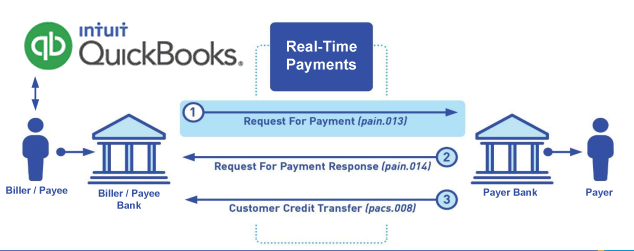
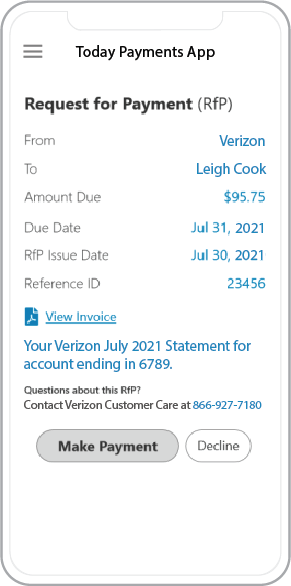 Call us, the .csv, text messaging and or .xml Request for Payment (RfP) file you need while on your 1st phone call! We guarantee our reports work to your Bank and Credit Union. We were years ahead of competitors recognizing the benefits of RequestForPayment.com. We are not a Bank. Our function as a role as an "Accounting System" in Open Banking with Real-Time Payments to work with Billers to create the Request for Payment to upload the Biller's Bank online platform. U.S. Companies need help to learn the RfP message delivering their bank. Today Payments' ISO 20022 Payment Initiation (PAIN .013) show how to implement Create Real-Time Payments Request for Payment File up front delivering message from the Creditor (Payee) to it's bank. Most banks (FIs) will deliver the message Import and Batch files for their company depositors for both FedNow and Real-Time Payments (RtP). Once uploaded correctly, the Creditor's (Payee's) bank continuing through a "Payment Hub", will be the RtP Hub will be The Clearing House, with messaging to the Debtor's (Payer's) bank.
Our in-house QuickBooks payments experts are standing ready to help you make an informed decision to move your company's payment processing forward.
Pricing with our Request For Payment Professionals
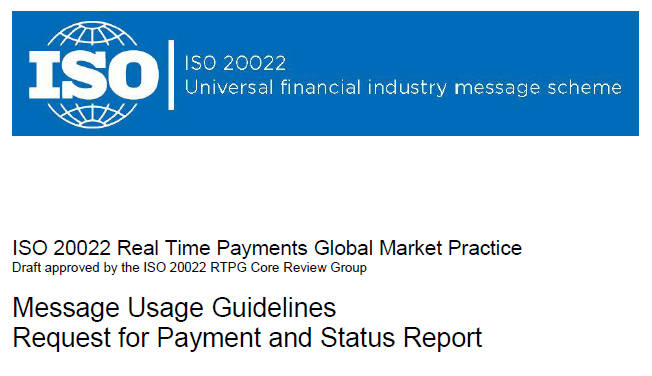
1) Free ISO 20022 Request for Payment File Formats, for FedNow and Real-Time Payments (The Clearing House) .pdf for you manually create "Mandatory" (Mandatory data for completed file) fields, start at page 4, with "yellow" highlighting. $0.0 + No Support
2) We create .csv or .xml formatting using your Bank or Credit Union. Using your invoice information database to create an existing Accounts Receivable file, we CLEAN, FORMAT to FEDNOW or Real-Time Payments into CSV or XML. Create Multiple Templates. You can upload or "key data" into our software for File Creation of "Mandatory" general file. Use either the Routing Number and Account Number for your Customers or use "Alias" name via Mobile Cell Phone and / or Email address.
Fees = $57 monthly, including Activation, Support Fees and Batch Fee, Monthly Fee, User Fee. We add your URI for each separate Payer transaction for additional Payment Methods on "Hosted Payment Page" (Request for file with an HTML link per transaction to "Hosted Payment Page" with ancillary payment methods of FedNow, RTP, ACH, Cards and many more!) + $.03 per Transaction + 1.5% percentage on gross dollar file,
3) Add integrating QuickBooks Online "QBO" using FedNow Real-time Payment using our Real-Time Payment Card system.
Fees Above 2) plus $29 monthly additional QuickBooks Online "QBO" formatting, and "Hosted Payment Page" and WYSIWYG
4) Above 3) plus Create "Total" (over 600 Mandatory, Conditional & Optional fields of all ISO 20022 Pain .013) Price on quote.
Start using our FedNow Real-Time Payments Bank Reconciliation:
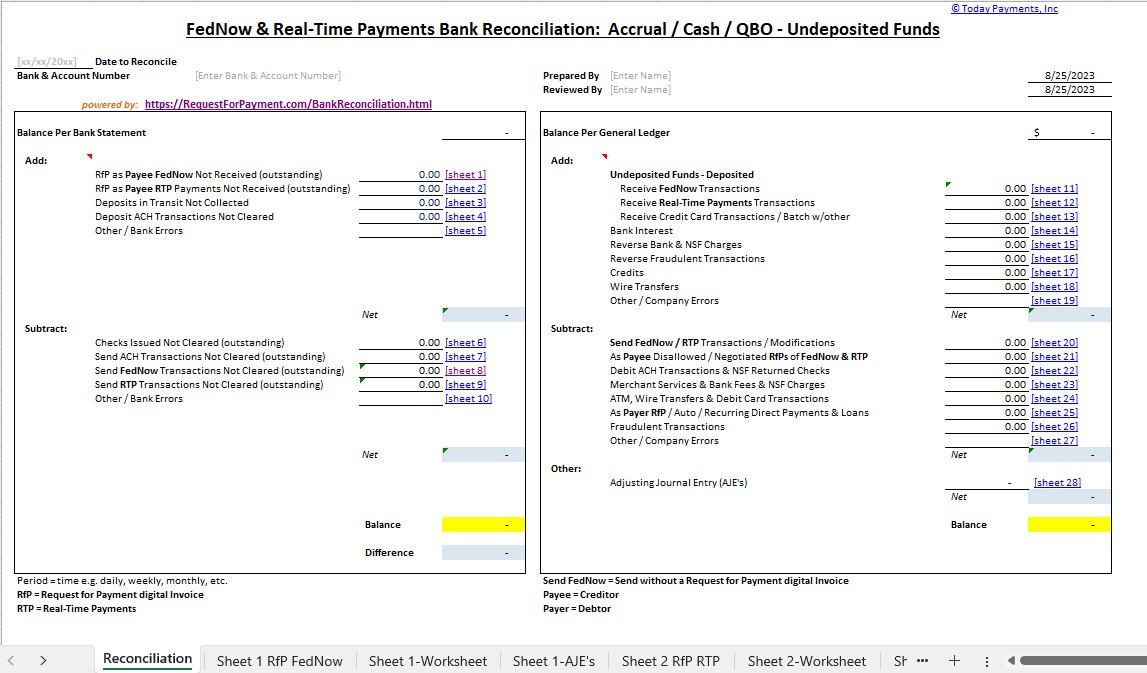
Dynamic integrated with FedNow & Real-Time Payments (RtP) Bank Reconciliation: Accrual / Cash / QBO - Undeposited Funds
Give Us A Call
(866) 927-7180